Remove the sound from a video
Sometimes you need the picture and the sound gets in the way: background music, noise, a private conversation. Remove the audio from a video in My Files and save a silent copy.
What is this feature?
Raheeb builds a new version of the video with the picture only, copying its data as-is without re-encoding, so resolution and orientation stay the same. The result is a silent file at the original quality, in seconds.
It's more useful than it sounds: a video you shot with music you don't want, a recording with voices you'd rather not share, or a shot you'll narrate later. The silent copy is saved next to the original in My Files, and the original stays untouched.
No re-encoding
The picture keeps its quality and orientation.
On your device
No upload, no waiting. Entirely local.
Original kept
The silent copy sits beside it and never replaces it.
Seconds
Far faster than opening a full editing app.
How to use it
- 1
Open My Files
And pick the video.
- 2
Tap ⋯
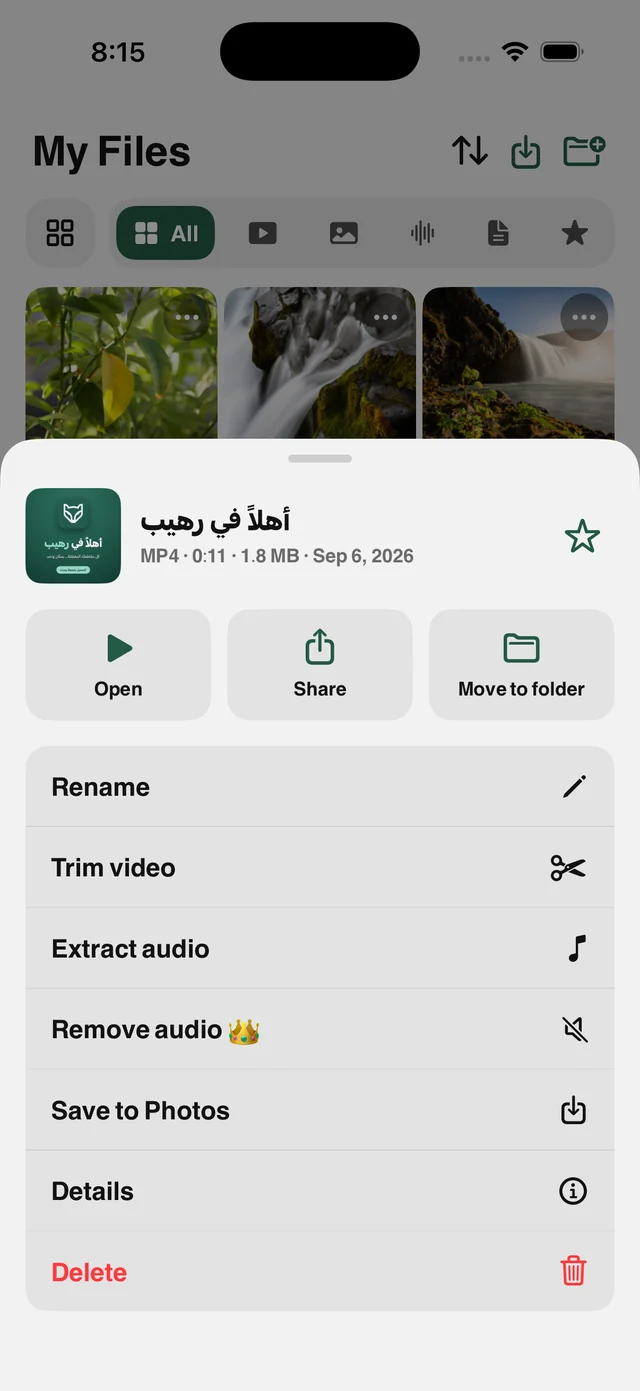
The file's tool sheet opens.
- 3
Choose Remove Audio
Processing takes seconds.
- 4
The copy is ready
The silent copy appears next to the original.
When to use it
Your own videos
Remove the music from a video you shot before you share it.
Privacy
Drop background conversation before sharing.
Voiceover
Prepare a silent shot to narrate in your edit.
Frequently asked questions
Does the picture lose quality?
Is the original deleted?
Can I get the sound back later?
Does it need internet?
Is it free?


Get Raheeb Free
On the App Store for iPhone and iPad. No account, and your first save takes seconds.