In this guide
- 1Where to find the video tools
- 21. Trim a video without losing quality
- 32. Crop to a ratio: 9:16 for Reels, 4:5 for posts
- 43. Change speed: slow motion or a faster explainer
- 54. Merge several clips into one video
- 6A practical order for a trip Reel
- 7Quick ideas for how you'll use it
- 8How it compares with Apple's built-in tools
Where to find the video tools
The tools live in two places, each suited to a different case:
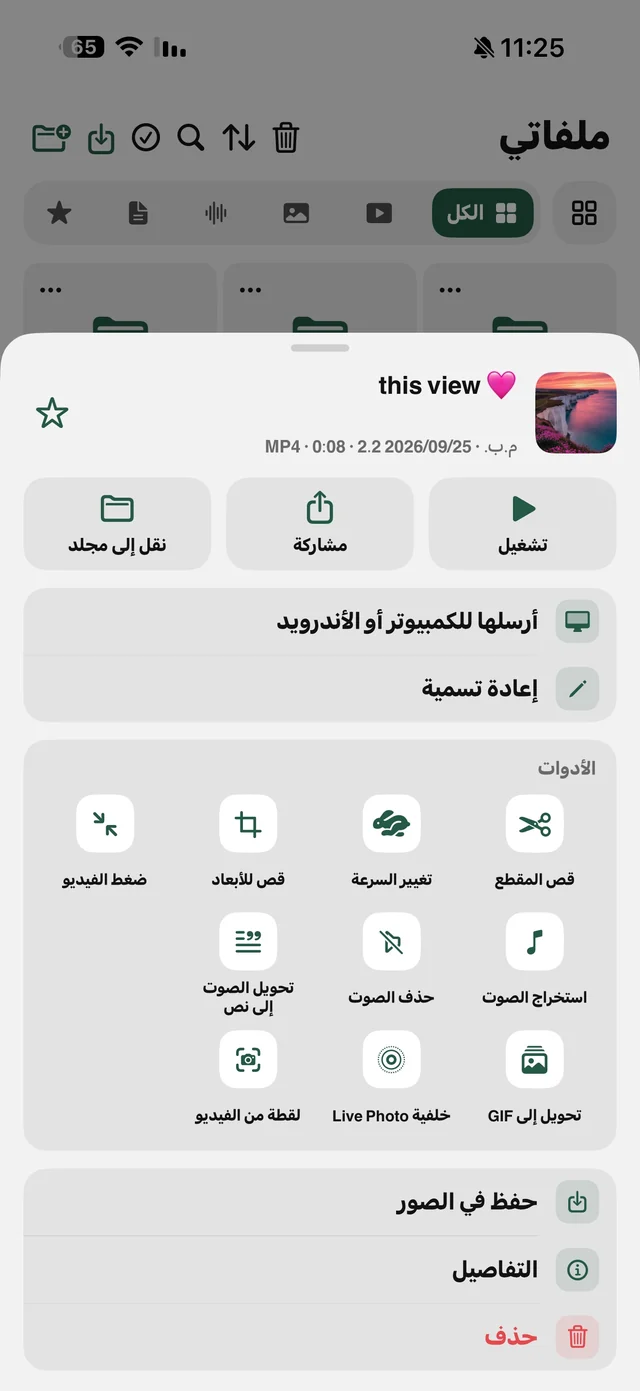
- The ⋯ button on any video in My Files: the “Edit video” group has “Trim video”, “Change speed”, “Crop to a ratio” and “Compress video”. Best for clips you downloaded or brought into My Files — and the same menu has remove audio if you want a silent copy.
- The “Video tools” card in the Tools tab: “Change speed”, “Crop to a ratio”, “Grab a frame” and “Merge clips”, picking the video straight from your Photos library.


1. Trim a video without losing quality
Most trimming apps rebuild the video from scratch, so you lose some quality and wait. Raheeb's “Trim video” cuts without re-encoding: it copies the same video data between the start and end you picked, so resolution doesn't drop and saving is fast. Details on the video trim page.
- 1Open My Filesand tap ⋯ on the video.
- 2Choose “Trim video”under “Edit video”, and the clip's filmstrip appears.
- 3Set the start and endDrag the two handles on the strip — the shortest part you can save is one second.
- 4Tap “Save”A new copy appears next to the original.
2. Crop to a ratio: 9:16 for Reels, 4:5 for posts
A landscape video you want as a Reel, or a vertical one you want as a square post? “Crop to a ratio” crops the video from the center to the shape you pick, and saves a new MP4 copy with the ratio in its name, like “(9:16)”.
| Ratio | Best for |
|---|---|
| “Vertical 9:16” | Reels · TikTok · Stories · Shorts |
| “Portrait 4:5” | Instagram posts |
| “Square 1:1” | Instagram grid · WhatsApp photo |
| “Wide 16:9” | YouTube · TV |
The ratio the video already has shows as disabled with “Already this ratio”. Keep in mind: the crop is always from the center, so if the person is at the edge of the frame they may end up cut out.
3. Change speed: slow motion or a faster explainer
The options: 0.5× and 0.75× to slow down, and 1.25×, 1.5×, 2× and 3× to speed up. The pitch stays exactly the same — voices don't turn squeaky or deep. The copy is saved with the speed in its name, like “(2×)”. A goal at 0.5×, or a long explainer at 1.5× so it fits a Reel's length.
4. Merge several clips into one video
- 1Open “Video tools”from the Tools tab and choose “Merge clips”.
- 2Pick the clips in orderfrom your Photos library; the order you pick them is their order in the video. Two clips minimum, no upper limit.
- 3Wait for the progress barYou can cancel midway.
- 4Open the resultAn MP4 named after the first clip plus “+” the number of the others, in My Files.
The merged video takes the shape of the first clip, and the others are fitted inside it without cropping. So pick a first clip in the orientation you want. A clip that only lives in My Files needs saving to Photos first with “Save to Photos” in its menu, because merging picks from the Photos library.

The video tools are free in Raheeb — prep your Reel on your phone.
A practical order for a trip Reel
- Trim each clip to the moment you want — trimming doesn't re-encode, so you lose nothing.
- Save the trimmed clips to Photos, then merge them in order, with a vertical clip first if the Reel is vertical.
- Crop to 9:16 if the result comes out in another shape.
- Change the speed of the shot you want in slow motion, then compress the video if it's too big to send.
- Want a cover for the Reel? “Grab a frame” pulls a photo from any frame — see the wallpaper and GIF article.
Quick ideas for how you'll use it
- Shop owners: trim a few seconds of a product video, make it 9:16 for Stories and a 1:1 copy for the Instagram grid — one clip for several platforms.
- Students: the key minute of explanation from a long lecture, at 1.25× if you want it even shorter.
- Sports: the goal at 0.5× as slow motion, then “Crop to a ratio” vertical for the Reel.
- Trips: all of the day's Stories in one clip with “Merge clips”, in the order they happened.
How it compares with Apple's built-in tools
The iPhone Photos app trims a clip's length and crops the frame to preset ratios, and that's enough for a quick edit. What Raheeb adds on top, especially for a clip you downloaded from TikTok and want to repurpose: speed changes for any clip with options up to 3× while keeping the pitch, merging in the same place, and every edit as a separate copy next to the original in My Files instead of changing the original. For a full edit with transitions, text and music you need a dedicated editing app — these are quick tools, not a replacement for one.